Chatleads: How We Turned Website Conversations Into a Usable Follow-Up Workspace
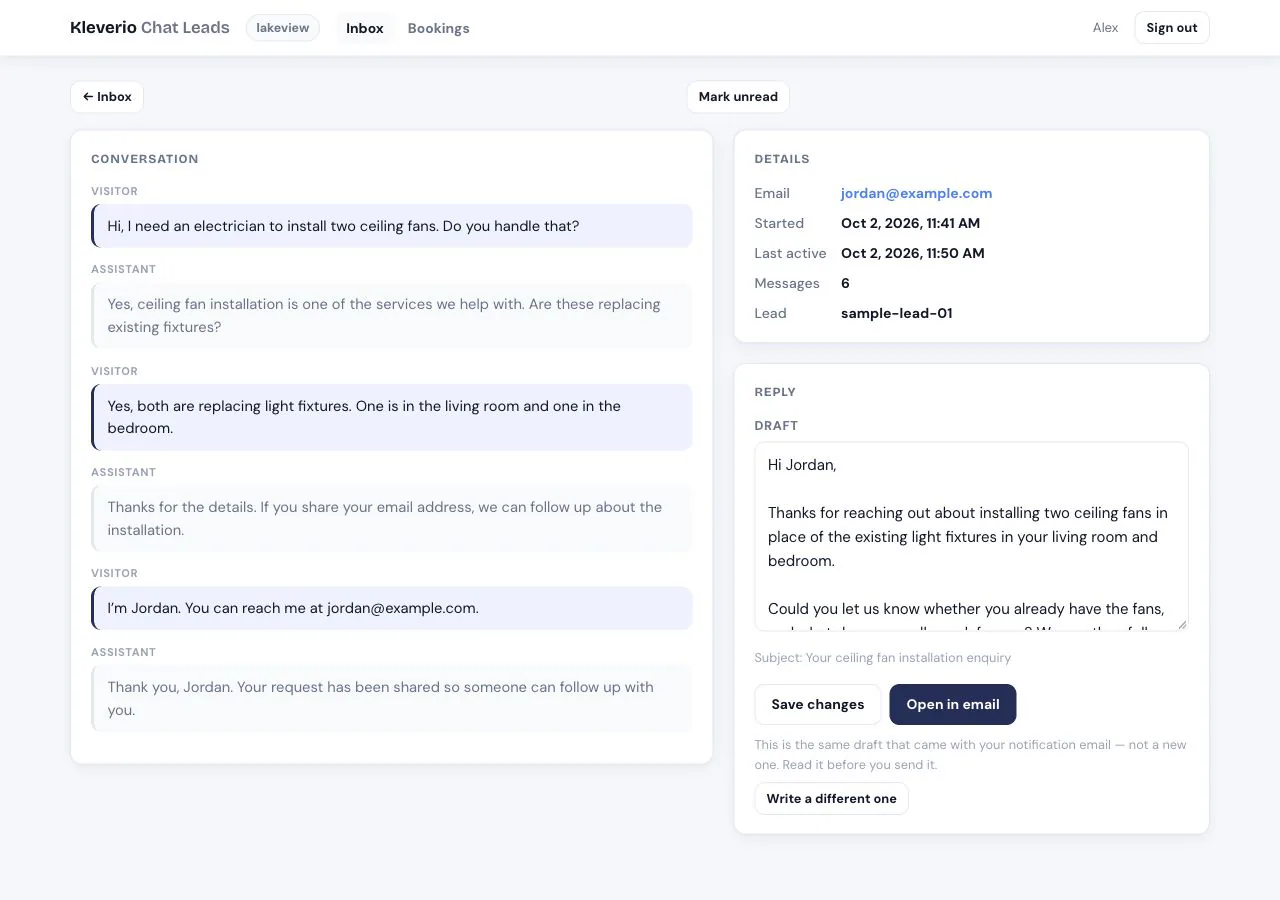
A website chat can answer a visitor’s question and still leave the business without a useful record of the conversation. Chatleads gives that record a home: a searchable inbox with the conversation and captured contact details. When a visitor becomes a lead, AI automatically generates an email reply draft from that conversation’s context, ready for a person to review and send.
We built it as the operational companion to Kleverio’s front desk. The front desk handles the visitor-facing conversation. Chatleads helps the business understand what happened and decide what to do next.
From a visitor’s question to a reviewed reply
Every conversation enters the inbox. When a visitor becomes a lead, the workflow also prepares an AI email draft for human review.
Visitor starts a chat
The front desk answers questions on the website.
Conversation is recorded
The transcript becomes available in the inbox.
Contact details are captured
The visitor’s enquiry becomes a lead.
AI drafts a reply automatically
The draft uses the conversation and captured details.
The team is notified
The lead email includes the context and reply draft.
A person reviews and sends
Edit the draft and open it in the email app.
The problem: the enquiry is more than the email address
A lead notification is valuable, but it is a narrow view. It usually arrives after a visitor shares contact details. Conversations that never reach that step can still reveal buying questions, confusion about services or a recurring obstacle on the website.
Even when an email address is captured, the business needs more than “new lead received.” What did the visitor ask? What did the assistant say? Is a reply already available? Has this person on the team read the conversation?
Chatleads brings those questions into one workspace, preserving conversations that would otherwise be invisible in a lead-only inbox.
One conversation record, with its context intact
The platform receives conversation updates from the chatbot’s stored records and keeps the transcript in Postgres. Users can open a conversation, read the exchange, see captured contact and lead details, and review the email reply draft that AI automatically generates when a lead is captured.
That gives a business a broader view of inbound interest. A conversation without a captured lead remains a conversation worth inspecting; it does not disappear because nobody filled in an address.
The synchronization runs outside the visitor’s request path. A problem in the reporting workspace should not prevent the front desk from answering a visitor. Separating those jobs also lets the inbox evolve without adding work to every chat response.
An inbox people can work through
The queue supports search, unread filtering and a distinction between conversations with a captured lead and those without one. The filters combine and remain in the URL through paging, so a person can return to the same working view.
Administrators can also separate customer tenants from demo prospects. Members stay within their own tenant’s scope. Search autocomplete uses that same scope and the same filters, so suggestions do not become a second, less protected route into another business’s conversations.
Read state belongs to each user. Opening a conversation marks it read for that person, not for every colleague. A teammate can therefore have an unread item even after someone else has looked at it.
These are modest interactions individually. Together, they turn a list of transcripts into an inbox a team can navigate deliberately.
Automatic AI drafts, with the send decision left to a person
When a visitor becomes a lead, AI automatically prepares an email reply using the conversation, the visitor’s request and captured contact details. The lead notification includes that draft, and Chatleads brings the same draft into the conversation view, ready to review. The business gets a relevant starting point without writing the first response from scratch.
A user can also request a fresh AI draft from the transcript. Generated drafts go through mechanical checks; a draft that still fails after the allowed rewrite is discarded. The user can edit the resulting text and use it for a reply.
There is no automatic send from this workspace. The draft is assistance, and the person owns the message that leaves the business. That is especially important because a transcript contains a stranger’s text, which cannot be treated as trusted instructions.
The boundary that matters: the assistant can help prepare a response. It does not acquire authority to send one merely because the text sounds confident.
Keeping each business’s conversations separate
Chatleads has its own database, separate from the outbound prospecting engine. A customer’s inbox and a sales prospect list are different products with different access needs.
Tenant scope is applied to the conversation queries, draft access and search suggestions. A member cannot widen that scope by changing a filter or guessing another conversation’s address. Read-state records are also attached to users rather than shared globally.
Access rules are tested through the actual queries and routes, not only by hiding controls on the page. An interface that omits another customer’s name is not enough if the underlying request can still retrieve their data.
What the platform delivered
Chatleads connects the visitor-facing chat to a human follow-up workflow. Businesses can inspect conversations, find captured leads, search for relevant context and work from an editable draft without treating AI output as an automatic response.
It also makes the unconverted conversations visible. Those records give a team material to investigate: questions that were not answered well, visitors who did not share details, or services that need a clearer explanation.
Make your website conversations useful beyond the chat window
If visitors are asking good questions but your team loses the context afterward, Kleverio can help connect the front desk, lead capture and human follow-up into one practical system.